KARMENLOOP / COMMAND LINE
KODER CLI
Your terminal. Your model.
Your way of working.
Give Koder a task, connect your own model, and review sensitive actions before they run.
CURRENT RELEASE / TERMINAL OUTPUT
KODER CLI 0.5.21 / HELP
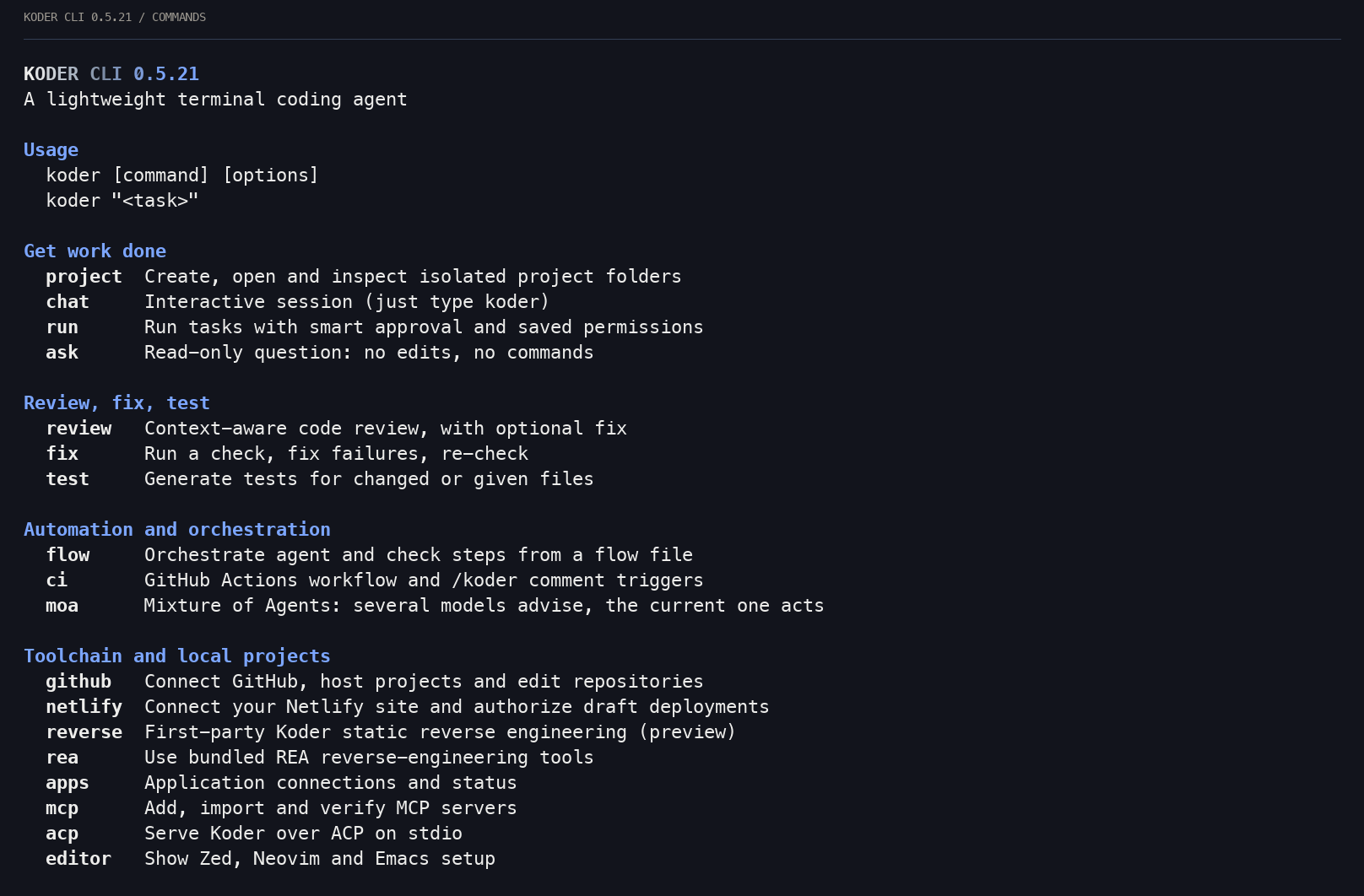
KODER CLI / 0.5.21
Task errors now include a report you can share.
Version 0.5.21 adds a report ID, specific error codes, the known cause or an explicit unknown cause, execution state and a next step. Local reports follow the Setup telemetry switch. Website tasks keep design-reading and preview tools available under an 8K context budget.
DISTRIBUTION / KODER MODULE
Get Koder CLI here.
Our server hosts the installers, packages and runtime. GitHub remains available for documentation and backup releases.
Copy the download link
Share the official Koder CLI download page.
Sign in to view this download.—successful copies
Loading the copy count…
Counts successful uses of our CLI download-link button. Repeat copies count too; this is not a count of unique people.
After installation
Start a task, connect a model, or look up a command.
Quick start
Quick start
Six steps from opening a terminal to the first change. Every command has a copy button.
-
Install from the repository
The install commands and each step are in the project repository. When it is installed, type koder.
-
Open setup
Setup starts when the install finishes. Choose the language, model, and colors with the arrow keys or the mouse. Your changes are saved automatically. Open it again any time, or switch only the language:
koder setupkoder lang zh -
Connect a model
Koder does not include a model. You choose a service, get a key, and pay that provider. Using OpenAI as the example, put the key in an environment variable, then tell Koder to read it:
export OPENAI_API_KEY="your-key"koder model set --preset chatgpt --key-env OPENAI_API_KEYIn Windows PowerShell, the first line is:
$env:OPENAI_API_KEY="your-key"For Ollama on this computer:
koder model set --preset local --model qwen3:8bThere are 36 presets. koder model presets lists them. The setup is saved in ~/.koder-cli/provider.json with mode 600. With --key-env the file keeps only the variable name. A key pasted in directly is saved as plain text. Then check everything:
koder doctor -
Go to your project folder and start
cd your-project-folder koderType what you want done and press Return. /help lists commands, /setup opens settings, /lang zh switches to Chinese, and /exit or Ctrl+D quits. By default it works in the current workspace. Access to the home directory or another directory needs a separate grant in koder permissions. The operating system still controls system permissions.
Koder CLI 0.5.21 · captured help excerpt · rendered from terminal characters. -
Approve the change
You can also give a task in one line, without a session:
koder run "npm test fails. Fix total() in cart.mjs"Smart approval handles ordinary project edits and low-risk commands automatically. To review each action, first run koder permissions execution ask. In ask mode, edits show a red/green diff; y accepts and other answers refuse. Sensitive actions still need permission.
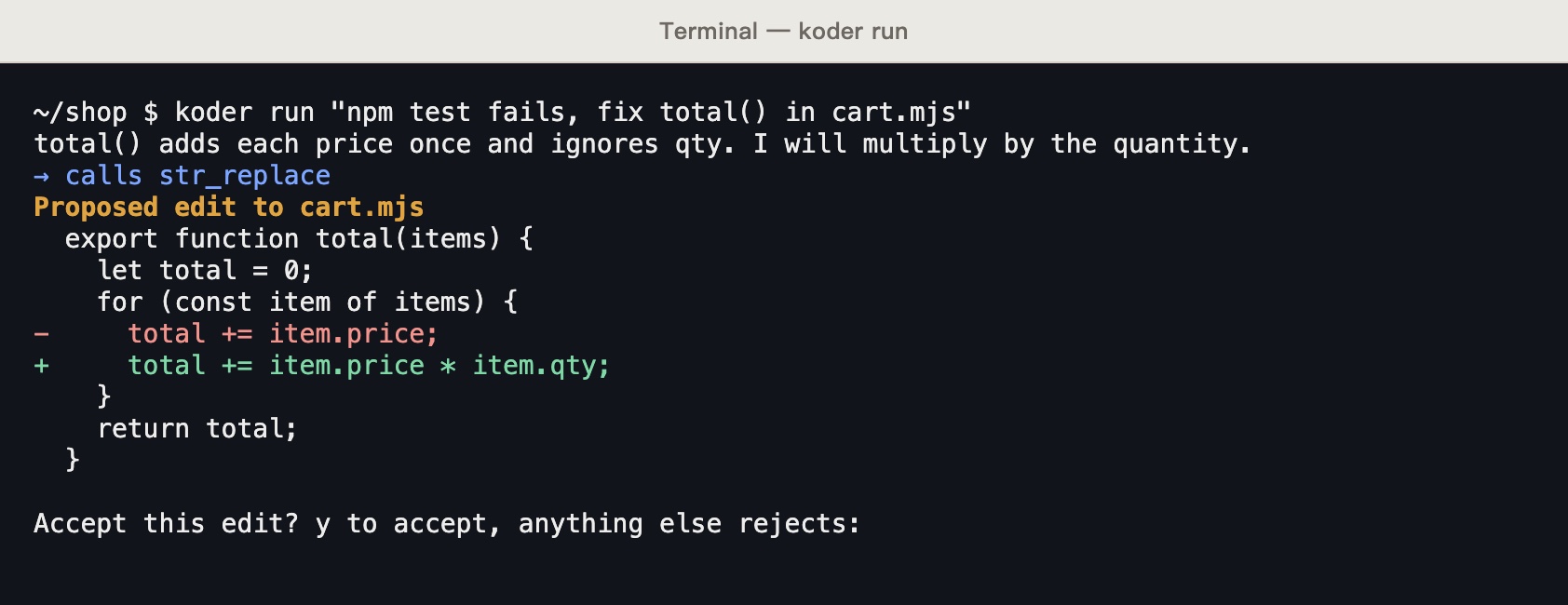
Historical controlled example from an earlier release. Screenshots: koder run fixing cart.mjs, waiting at the accept question. The capture used a local test endpoint that replies from a script, not a real model. -
Follow the tutorial
The terminal has a 30-lesson interactive tutorial, and it remembers your place. --print shows the text only. --os switches the edition to powershell, cmd, mac, or linux. Lesson 16 is install and update.
koder learnkoder learn 3koder learn --print --os powershell
Commands
Commands
Every command has its own help. Type koder help and the command name.
koder ask
Read-only questions. It can list folders, read files, and search. It does not change files or run commands.
koder ask "Which file does the sign-in flow start in?"koder run
Runs one task. It can change files and run commands, using smart approval and saved permissions. Piped input goes to Koder as extra material.
npm test 2>&1 | koder run "Fix the tests using this failure output"koder review
Gathers the changes, the repository layout, rule files such as AGENTS.md, and recent commits. Each finding has a file, a line, a level, and a suggested fix.
koder review --base origin/main --format markdown --out review.md koder fix
Runs a check. If it fails, Koder gets the output and fixes it, then checks again until it passes or runs out of tries. The default is 3.
koder fix --check "npm test"koder test
Reads your existing tests first and follows their folders and style, then adds tests for the changes or the files you name.
koder test src/price.js --check "npm test" koder flow
Chains steps in one JSON flow file: shell, run, ask, review, fix, and test. Steps can have conditions, and read-only steps can run in parallel.
koder flow init pr-gatekoder ci init
Writes .github/workflows/koder.yml. It reviews and comments when a PR opens or changes. A PR comment such as /koder review or /koder fix runs that action. Commands that change code are accepted only from repository members.
koder ci initkoder update · koder uninstall
Updates to the latest version. Uninstalls Koder CLI. Add --purge to remove the setup too.
koder update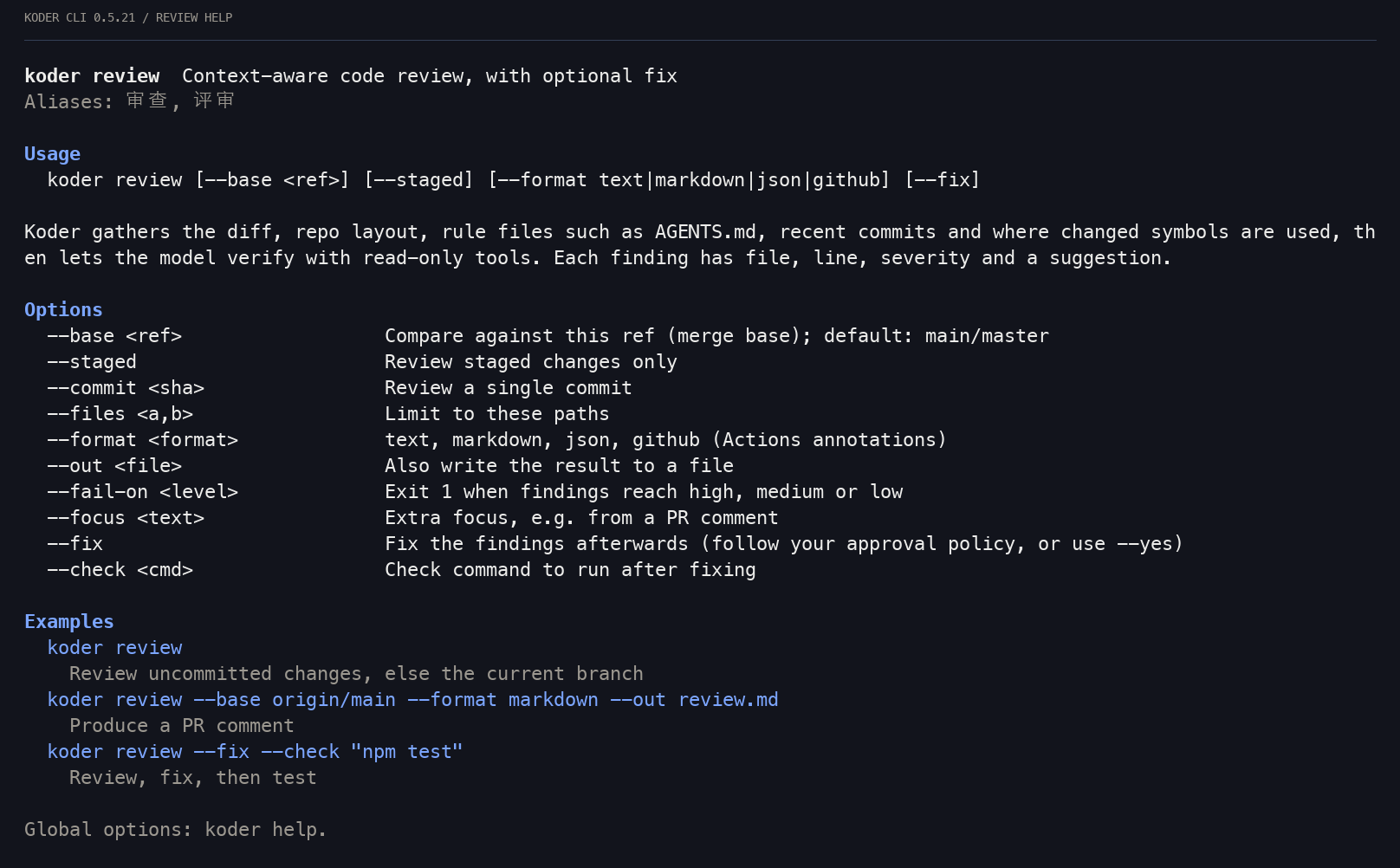
| Global option | What it does |
|---|---|
| -w --workspace | The workspace. The default is the current folder. |
| -y --yes | Handles file changes and commands under your execution settings. Sensitive actions still need permission; it does not answer questions or collect passwords. |
| --json | One JSON event per line, for scripts |
| --mode | standard, code, minimal, plan, execute, report, enhance |
| --lang | Chinese or English for this run |
| --no-color | Turns color off |
CLI & TUI
CLI & TUI
Neither is in the desktop installer, and neither needs the desktop app. The desktop window has its own terminal at the bottom (⌘J / Ctrl+J), which is an ordinary terminal.
Koder CLI
The command is koder. Type koder to start a session. koder run takes one task, koder ask answers read-only, koder review reviews changes, and koder fix keeps fixing until a check passes. It works in pipes, scripts, and CI. Quick start
Koder TUI
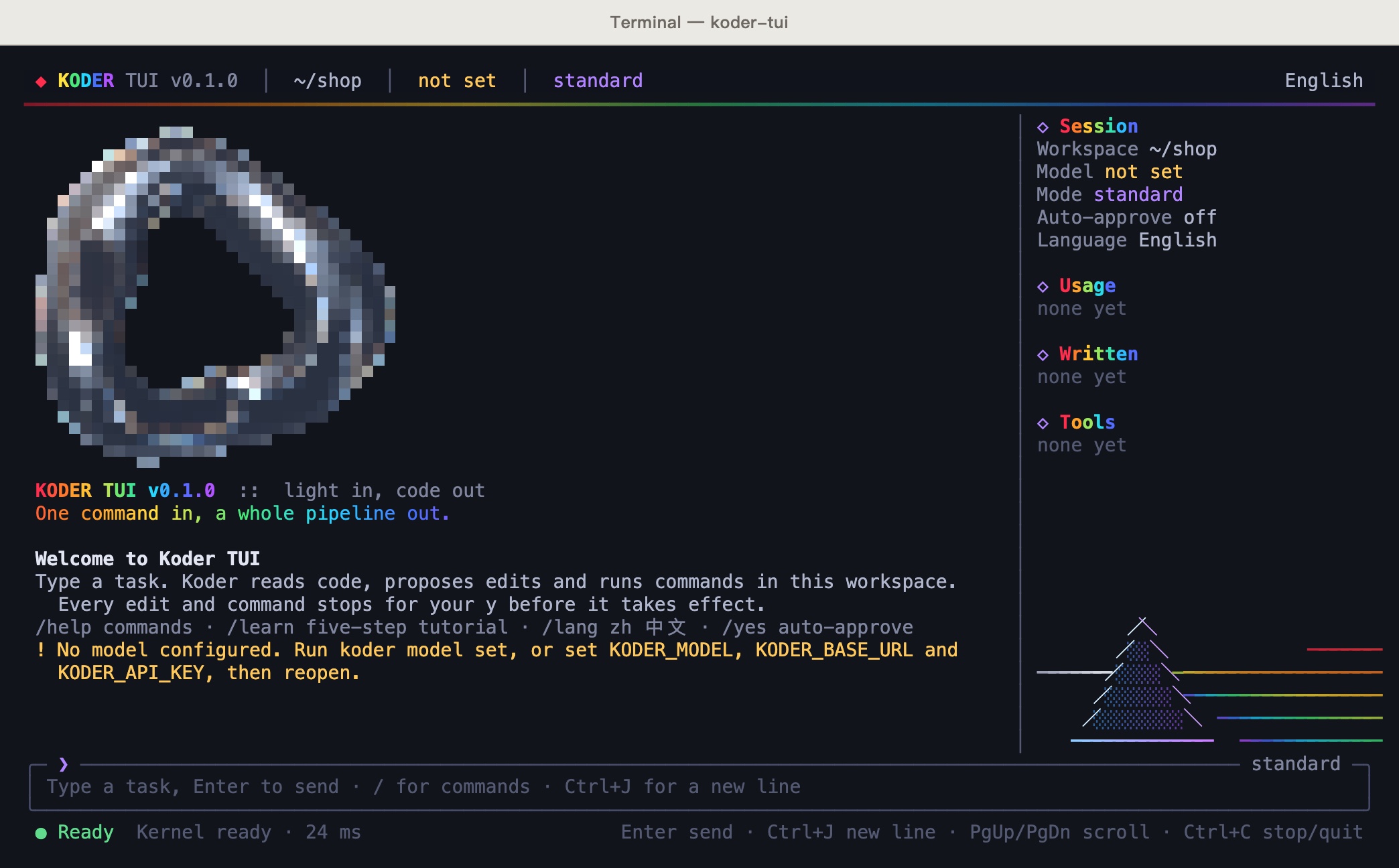
The command is koder-tui. A status bar on top, the chat in the middle, a sidebar on the right, and the input at the bottom. Review the proposed file changes, then press y to accept or n or Esc to reject them. See the TUI
TUI / 0.3.1
More room for terminal work.
Koder TUI has its own download page for Windows and Mac. Its version is released separately from the CLI.
Earlier TUI command-line reference (0.1.0)
Koder TUI 0.1.0
A full-screen terminal interface
- The top bar shows the version, workspace, model, and mode. The chat is in the middle, with the input and status bar at the bottom.
- The sidebar on the right shows the session, usage, written files, and tools. It appears when the terminal is at least 110 columns wide. /sidebar hides it.
- Review the proposed file changes, then press y to accept or n or Esc to reject them. Commands ask first too.
- /yes approves only changes and commands. Questions for you still ask, and it never fills in a password.
- It shares the model and language setup with koder.
DISTRIBUTION / KODER MODULE
Get Koder TUI from GitHub.
Our server hosts the installers, packages and runtime. GitHub remains available for documentation and backup releases.
TUI quick start
Five steps. Inside the app, /learn has a five-step tutorial too.
-
Install from the repository
The install commands are in the TUI section of the project repository. When it is installed, type koder-tui.
-
Connect a model
The TUI reads the model saved by koder setup. If that is already done, there is nothing more to do. Without the CLI, install it above and open koder setup, or run koder model set. You can also set these three environment variables before you open the TUI:
export KODER_MODEL="model-name" export KODER_BASE_URL="compatible-endpoint" export KODER_API_KEY="your-key" -
Go to your project folder and open the TUI
cd your-project-folder koder-tuiType a task. Enter sends and Ctrl+J starts a new line. Add --no-splash to skip the intro.
-
Type / for commands
Typing / opens the command palette. Keep typing to filter, and press Tab to complete.
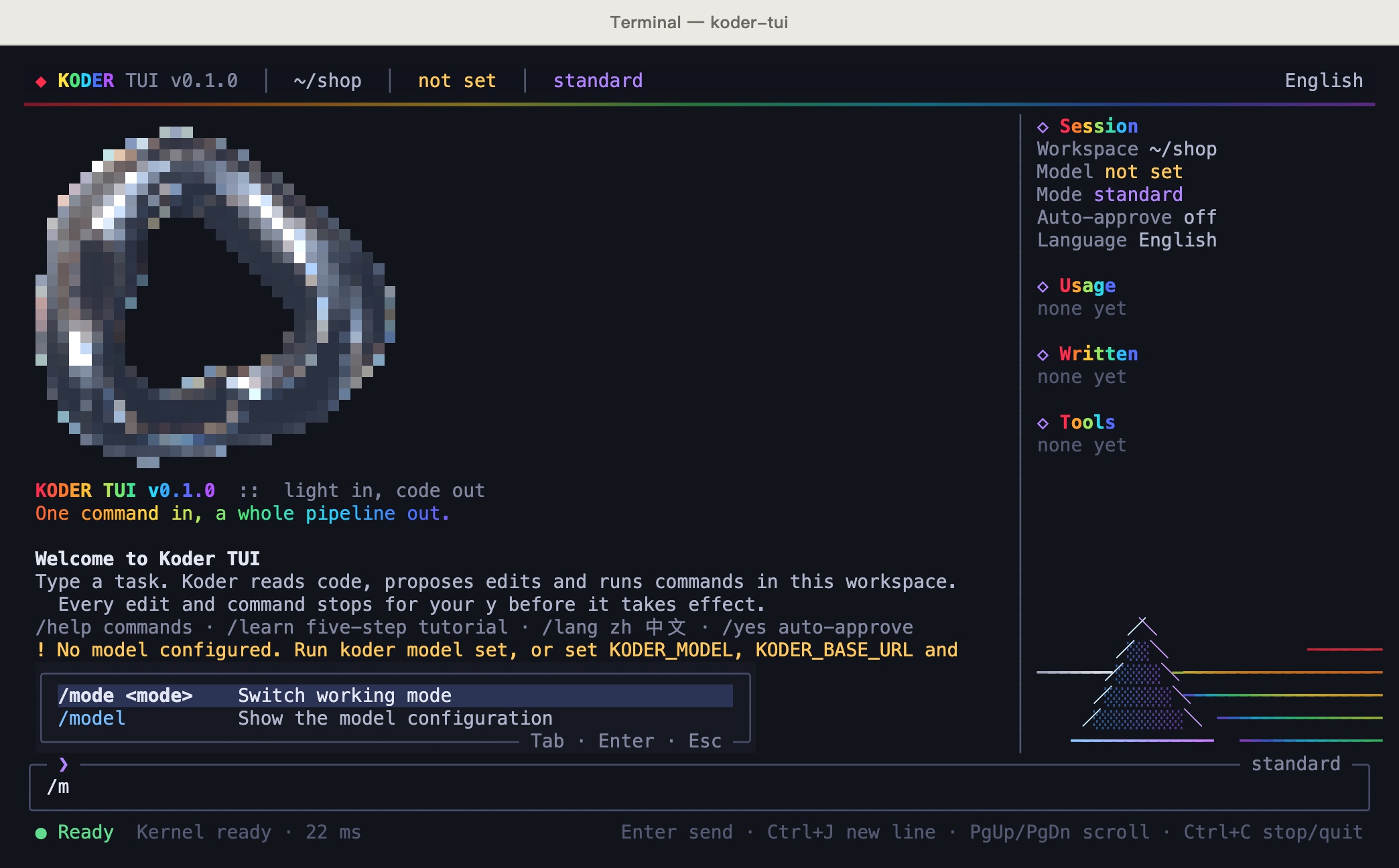
Historical controlled example from an earlier release. Screenshots: after typing /m, the palette shows /mode and /model. Shot on 0.1.0. -
Approve the change
When Koder wants to change a file, a diff opens. Press y to accept, n or Esc to turn it down, and ↑↓ to scroll. Esc also interrupts the current turn. Changes you already accepted stay.
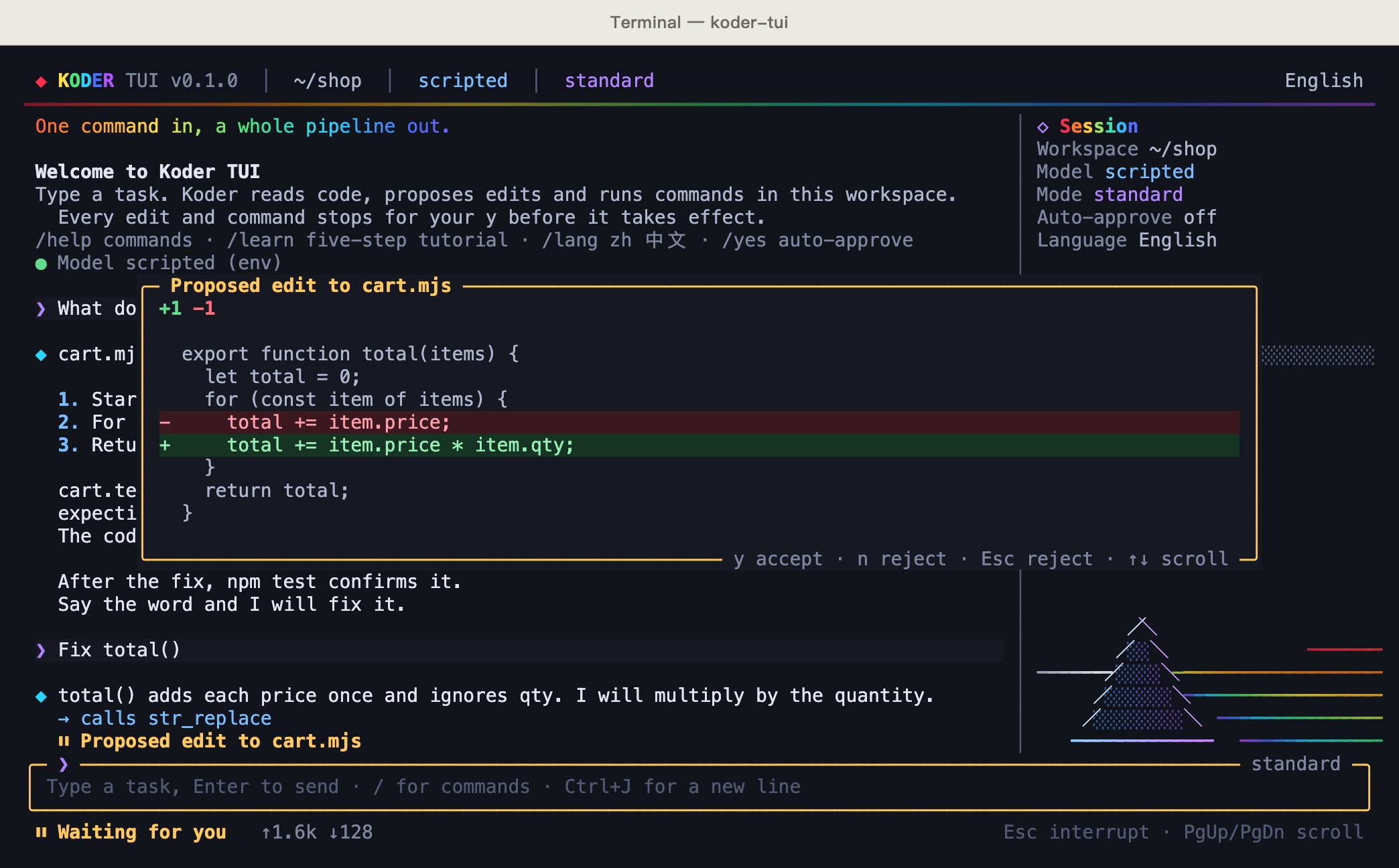
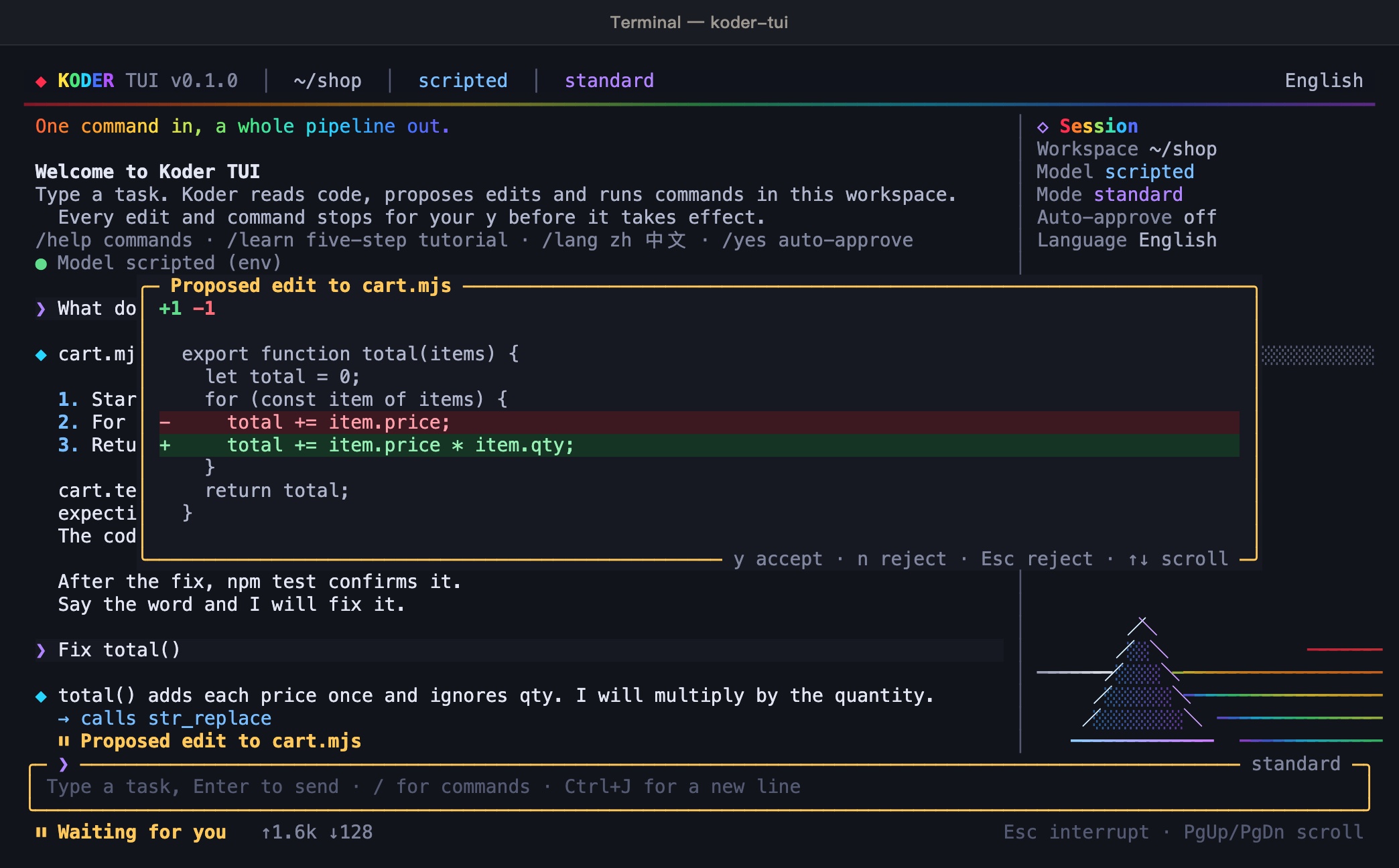
Historical controlled example from an earlier release. Screenshots: the diff for a change to cart.mjs, with the status bar waiting for you. The capture used a local test endpoint that replies from a script. The model name scripted in the top bar is that endpoint, not a real model. Shot on 0.1.0.
| Slash command | What it does |
|---|---|
| /help | All commands and keys |
| /learn | Five-step tutorial |
| /lang | Language: /lang zh or /lang en |
| /mode | Switch working mode |
| /yes | Toggle auto-approve (edits and commands only) |
| /new | Start a new session |
| /clear | Clear the screen log |
| /model | Show the model configuration |
| /sidebar | Show or hide the sidebar |
| /banner | Replay the prism intro |
| /exit | Quit Koder TUI |
| Key | What it does |
|---|---|
| Enter | Send |
| Ctrl+J Alt+Enter | New line |
| ↑ ↓ | Previous / next input |
| PgUp PgDn | Scroll the log (Ctrl+↑↓ by line) |
| Esc | Interrupt the current turn |
| Ctrl+C | Interrupt; twice when idle to quit |
| Ctrl+D | Quit when the input is empty |
| Ctrl+L | Redraw the screen |
| Tab | Complete a slash command |
JSON output and editor integration
CLI / SCRIPTING
JSON output and editor integration
koder run --yes --json "Add install steps to the README"koder editor zedQuestions
Questions
Do I need an invite code?
No. The CLI and the TUI install directly. Only the desktop installer needs an invite code to download.
Do I need administrator or sudo?
No. The install notes are in the project repository.
Where is my key stored?
The model setup is in ~/.koder-cli/provider.json with mode 600, so only you can read it. With --key-env the file holds only the variable name, and the key stays in your environment.
Does it run on Windows XP?
No. Windows XP cannot run these commands. Windows needs version 10 or 11.
How does this relate to Koder for computers?
They are separate. The desktop app is a window, see Koder IDE. The CLI and the TUI live in the terminal and do not need the desktop app.
Koder CLI 0.4.18
Related resources
1 / 2
Related resources
Use a CLI subscription with its own sign-in
Use a CLI subscription with its own sign-in
Alibaba Token Plan and Volcano Coding Plan are currently gray and unavailable. Alibaba Coding Plan retains a separate entry and still requires verification with your own account. Ordinary API and subscription credentials are not interchangeable. A fallback never silently changes the billing endpoint. Native Koder is the default; the internal fallback is disabled and gray.
- Alibaba Token Plan (unavailable; endpoint identifies saved profiles):
https://token-plan.cn-beijing.maas.aliyuncs.com/compatible-mode/v1, with the key issued for that Token Plan. - Alibaba Coding Plan:
https://coding.dashscope.aliyuncs.com/v1, with its own Coding Plan key. It is a separate product. - Volcano Coding Plan (unavailable):
https://ark.cn-beijing.volces.com/api/coding/v3. Useark-code-latestto follow the console selection.
Your console determines models and quota. Explicitly run koder model test --tools to check continuation; it calls the API and may cost money. Full setup guide.
Optional features, with the full privacy text included
Optional features, with the full privacy text included
Use koder privacy consumer for the complete CLI consumer terms and koder privacy statement for the privacy statement. The complete official consumer originals are retained too, with desktop and CLI behavior distinguished.
Full CLI consumer privacy terms · CLI privacy statement · Chinese terms · Original sources and hashes
Say that you want to give feedback, or run koder feedback, for info@karmenloop.com and a blank template. Koder does not send email, logs, or chat history automatically.
Six seconds for a little celebration
Six seconds for a little celebration
koder celebrate offers code rain, confetti, fireworks, Christmas, Halloween, National Day, New Year, and birthday effects. They last about six seconds; any key skips. Enter leaves the menu. Scripts and JSON never animate.
Supported holidays receive one greeting on the local date. Automatic effects are a separate choice, and you can add your own annual occasion. A birthday stores only a confirmed month and day. Music and IP country lookup are off by default and confirmed separately. Chinese and English wishes come from the KARMENLOOP team.
The default melody is generated locally. If a browser blocks autoplay, press Play; Koder does not bypass that policy or keep opening tabs. Your chosen language and enabled local language counts outrank the weak IP-country hint. koder celebrate auto off and koder celebrate music off turn off the corresponding features.
The tutorial now has 30 lessons, including subscriptions, MiMo tool continuation, privacy, feedback, and celebrations. Read the full tutorial.
Integration status and smart approval
Integration status and smart approval
Kimi and DeepSeek are temporarily unavailable. Retained protocol fixtures and recovery code do not mean these entries work. Re-enablement requires separate acceptance.
Smart approval runs low-risk checks and ordinary project edits automatically. Sensitive prompts offer one-time approval, Always allow, or full access. Inspect with koder permissions execution status. Save full access for this project with koder permissions execution full --confirm FULL; explicitly add --scope profile for all projects. Use koder permissions execution reset to revoke all execution settings. Full access can run code, modify/delete files and use authorized apps; it cannot supply passwords or grant OS access. Permissions stay on this computer and are never memory-synced.
Personal use and company licensing
Personal use and company licensing
New CLI distributions adopting Koder-EULA-1.1 are free for personal, noncommercial use. Commercial use, paid client work and organizational deployment require separate written authorization. The personal license grants no secondary development or proprietary code-modification rights. Earlier distributions and third-party components retain their own licenses.
The local KARMENLOOP task kernel connects plans, permission checks, tools and saved results. Public descriptions cover capabilities without publishing private development source.
Company licensing + dedicated private repositories: info@karmenloop.com. A separate written agreement defines users, deployment, repository contents, maintenance, support and any development rights. An inquiry does not provision a repository or grant commercial rights.
Find Koder useful? An optional GitHub star helps others discover it. Skip freely; it never affects access.
Local private collections let Koder find skills and templates on demand. Model access is off by default; explicit authorization allows selected excerpts to reach the configured model. Original collections are excluded from public packages and the website, and bundled scripts never run on import. See private collection controls or run koder business for licensing inquiries.
The official encrypted reference library retrieves selected workflows without preloading the full library. Its first edition contains 1,004 licensed Koder adaptations, with required third-party notices. Search keywords and resource IDs reach the official service; keep queries free of private data. Disable with KODER_REMOTE_RESOURCES=0. Read the retrieval and privacy guide.
Systems and versions
Systems and versions
| Product | Version and system | Install |
|---|---|---|
| Koder desktop | macOS 0.4.56 · Apple silicon · macOS 13+ / Windows 0.4.56 · 64-bit Windows 10 / 11 | [ RELEASES ] |
| Koder CLI / TUI | 0.4.18 / 0.1.0 · macOS / Linux / Windows 10 / 11 | Install guide · No invite code required |
What is in CLI 0.4.18
Koder CLI 0.4.18: a release for Windows and macOS
0.4.18 is available for Windows and macOS. Approved MCP calls now have a three-minute default deadline. Pending mail alerts recover after restart, and downloaded GitHub Skills support short-name selection and Setup switches. Unlimited rounds, cancellation, optional cost budgets and the 1,800-lesson classroom remain. Native-device and real-account beta checks are tracked separately.
Installation and workflow navigation
GitHub connection and project guide
The release retains all existing features. Real-model quality scores and final-package Windows client acceptance remain unverified; read the release notes for the exact scope.
Start in a project folder with koder, or use koder ask, koder run and koder review. For separate terminal tasks, choose names such as koder chat --session website and koder chat --session tests. Each task keeps its conversation and approvals; shared project files still need coordination.
Download and install
Open the official GitHub Releases page for the current version, platform instructions, and license requirements.
Update and learn
Run koder update --check, then koder update, and verify koder --version reports 0.4.18. If an older updater reports a changed agreement, use the ordinary installer and explicitly accept the displayed terms. Settings, history and channel bindings are retained.
GitHub release and checksums · 0.4.18 release notes · Complete English guide · All 30 lessons
The release channel identifies this distribution. Native Windows checks retain their documented scope: PowerShell 5.1 cold startup, full installation and updates on Windows user devices, Chinese input and GUI operations still require their respective acceptance. Live model access depends on your configured provider and account.
Configure once, keep control
Windows x64 includes Windows-MCP 0.8.8 and Python 3.14.8. In Setup, configure, test and enable the bundled connection; no global Python install is needed. macOS uses its existing computer drivers. Timed-out installs retain uncertain receipts for diagnosis instead of being blindly retried.
Bind 163 or another supported mailbox in Setup. Native sending still needs final recipient and content approval. Separately authorize mail monitoring: an activated running host polls every 30 seconds by default, with quiet hours and daily limits. Sleep/network restrictions can delay alerts. Headroom is enabled by default and can be disabled in Setup → Skills.
Windows client cold installation, MCP GUI, real mailbox accounts and model-quality checks remain unverified for this release.
Windows-MCP · Mail guide · Headroom · Install recovery
Upgrading from 0.4.4 or earlier? If update reports an invalid manifest, run the current official installer once. The old updater limits packages to 100 MB; 0.4.5 and later use a bounded 512 MiB limit. Configuration and history stay separate. Migration guide.
MCP and Skill setup, switches and troubleshooting · 72-entry inventory and external dependencies
Earlier release notes
Celebrations return control promptly
Preview.22 removes an extra process wait after standalone celebrations. Full playback stays at six seconds; press any key to skip. Settings and celebrations in chat return to the same prompt.
preview.21: keep working when memory permissions need attention
A memory isolation check no longer stops every chat request. Unverifiable history stays untouched while tasks continue in temporary RAM. History reads and writes, personalization and synchronization stay paused; Koder does not silently choose another location. Closing or manually updating does not restore that temporary conversation. Automatic installation waits.
Use /memory diagnose or koder memory diagnose --json for the selected location and recovery guidance. Private inherited Windows permissions can be sealed without adding access. Broad or unverifiable roots remain protected. Account changes reset temporary context; execution approvals still apply.
preview.19: our autonomous learning method, built in
KARMENLOOP personal-agent-growth 0.3.2 now ships with the CLI. Relevant tasks can use its preparation, failure analysis, review and recovery methods through the existing Skill tool. No separate Skill download is needed.
koder growth status checks the embedded version; koder growth show reads the method. koder growth off and koder growth on apply to the next CLI session. Task notes stay in the authorized workspace. This adds no background service, automatic profiling, synchronization or new execution authority. Timed continuation requires an actually available, separately authorized host backend.
Usage and host requirements. The eight unchanged method files retain their own license and notice. Synthetic tool-loop tests are distinct from real-model behavior and physical-device acceptance.
Preview.18: permissions that save, updates that report back
A damaged execution-permission record no longer ends the approval flow before you can answer. Valid UTF-8 BOM records load normally. For a damaged record, make a fresh choice: allow this action once, remember this action, or grant this workspace full access. Koder backs up the old bytes before saving a replacement and never trusts a damaged grant.
Celebrations now emit valid terminal RGB colors, while retaining six-second playback, any-key skipping and reduced-motion settings. Repeated Windows checks cover startup, WeChat update handoff and terminal animations with the original deadlines. Historical failures remain in the release record. Installer test fixtures now use the real installer's argument transport to avoid redirected-input stalls.
A failed background installation now displays a retry message while your current chat remains usable. Installed chats check at most once every six hours and wait for tasks, queued input and drafts before switching. Changed terms still require review. Use /update auto off or /update auto on. Users on preview.16 or earlier should run koder update once first.
Full access controls Koder's execution approvals; it does not grant Windows administrator rights. Repairing this permission-record error does not require changing the machine-wide PowerShell policy. Permission recovery and troubleshooting.
0.4.0-preview.30 Beta: a focused fix for concurrent terminal tasks
This release keeps the complete preview.29 runtime and fixes session ownership. A new default task receives its own session even when an older process holds only a per-turn lock. A worker disconnected from its supervisor cancels its pending request and releases its own session. A recycled process ID no longer makes this process's stale record look like a running task.
A busy notice no longer asserts that another visible window exists. Explicitly named sessions in use remain protected. Koder does not force-unlock records based on age, delete history or stop other tasks.
Start two or three tasks
Run one command per terminal: koder chat --session website, koder chat --session slides and koder chat --session tests. Or run koder in each window: an occupied default session gets an independent name, with a command to resume it later.
Conversations, task memory, approvals and cancellation stay separate. Project files are still shared; use separate project directories for independent artifacts. Keep the displayed session name, close completed older tasks normally, or choose another name. Do not delete memory or terminate unrelated Node processes. Complete multi-window guide.
Update and learn
Run koder update --check, then koder update, and verify with koder --version. Existing settings, history, model routes, Skills, permissions and tutorials remain available.
GITHUB · [ RELEASES ] · [ RELEASES ] · Full release notes · Complete English guide · Chinese guide · All 30 lessons and eight shell editions.
Three-task CLI entry checks passed in isolated Windows Server 2025 and Windows 11 ARM64 environments using local synthetic responses, with no paid model calls. This does not certify PowerShell 5.1 cold startup, full installation and updates on Windows 10/11 user clients, GUI focus, Chinese IME or UAC. Live model accounts retain their separate acceptance requirements. The preview.29 capabilities and original test record remain below.
0.4.0-preview.29 Beta: independent tasks in several terminal windows
Open two or three terminals for a website, slides and tests. A new window receives its own session name when the default session in that project is busy. For explicit names, use koder chat --session website, koder chat --session slides and koder chat --session tests. Each session keeps its own conversation, task memory, approvals, cancellation and recovery. A busy named session is never taken over.
Separate sessions do not copy project files. Tasks editing one path still need coordination; use separate project folders for independent artifacts. Deliberately shared notes, provider settings and global preferences keep their existing scope. Full multi-window guide.
Fill a draft, then edit and send
Type / at an empty prompt for context suggestions, saved templates and commands. Browse with arrow or page keys, and fill with Tab. After explicit navigation, Enter also fills without sending. Edit, then press Enter to send; Esc closes the list. Exact slash commands and paste retain their normal behavior. Input and writing guide.
Clearer provider errors and traceable writing
Official MiniMax responses with HTTP 422 + 1026/1027 report content review separately from parameter, authorization, quota and network failures. Koder does not silently change hosts, resend, rewrite history or replay completed tools. Error categories and troubleshooting.
Writing length checks the actual file delivered in this turn first. Version documents, installed runtime facts and evidence of new changes stay distinct. Missing evidence can be disclosed as not new in this release; acceptance terms and tags do not prove additions. Named-draft compression records its path and SHA. Long-context projection retains early task markers and constraints. Real-model writing scores have not been rerun; no target score is claimed.
Task execution, crawling and reverse analysis retain existing approvals
Task context, actual tool discovery, result continuation and recovery remain available. Crawling bounds hosts, pages and returned content. First-party reverse analysis reads only approved files. It does not scan the whole computer, grant new execution rights or replace every third-party tool. Task execution and recovery · Crawler and reverse-analysis guide.
Install, learn and check the test scope
GITHUB · [ RELEASES ] · [ RELEASES ] · Complete English guide · Chinese guide · All 30 lessons. Chinese and English each include PowerShell, CMD, macOS and Linux editions.
The candidate records 377 local regressions, exact-package three-process checks and an isolated Mac installation. PS5 cold startup, Windows 10/11 user clients, this version's full Windows install/update, Chinese IME and native multi-window behavior remain unverified. These checks do not certify live accounts or writing scores. Existing preview.28 Windows-MCP results on Windows Server 2025 and Code Graph results on Mac retain their original scope. Previous upstream acceptance · Release details.
0.4.0-preview.28 Beta: Windows-MCP and workspace code graphs
Run /setup in the current terminal and choose Applications and MCP to configure Windows-MCP or CodeGraphContext. Run koder mcp presets for the command-line inventory. Presets start disabled: check, test, then explicitly enable them. Windows-MCP runs only on local Windows 10/11 and requires the separately installed upstream program and Python 3.14. It does not grant administrator rights.
Code Graph uses a separate runtime home and index database for each workspace. The model discovers the actual tools, queries callers and impact, then reads the source. Missing or stale indexes fall back to source search; Koder does not automatically index the whole computer. Graph and desktop operations retain existing approval checks.
Complete Windows-MCP and Code Graph guide · Chinese integration guide. The following quality checks remain available.
A technical-decision-maker introduction requested at about 800 Chinese characters now reports a 720–880 Han-character check. Release writing can read workspace version materials; two matching facts require two actual line references. Comparison compression records the previous draft hash and checks new numerals and selected technology names.
koder project check inspects README, test or verification entries, Docker files and basic static HTML without a model. Recognized creation tasks return exit 3 for missing structure and retain written files. File inspection never runs project scripts and is not a successful test or design grade. An early preview around three minutes and at least 15 generator tests remain delivery targets, not claimed benchmark results.
Preset counts distinguish selectable routes from held integrations; selectable does not mean account verified. MiMo Token Plan, Kimi API/Code, DeepSeek, Alibaba Token Plan, Volcano Coding Plan and Ark API remain gray. No silent provider or billing-route fallback is enabled.
Complete guides and installers
Complete English guide · Chinese guide · Quality checks explained · [ RELEASES ] · [ RELEASES ]
Eight text editions cover PowerShell, CMD, macOS and Linux in Chinese and English, with 30 lessons and 49 command entries. The original 12 benchmark prompts are preserved. This task passed 87 program contracts and 33 app, installation and update regressions. After publication, Windows-MCP PowerShell, Snapshot, Click, Type and public-package Agent continuation passed on isolated Windows Server 2025. Actual graph and Koder calls passed in an isolated Mac environment. Windows 10/11 user PCs and other combinations remain unverified. Tested combinations, prerequisites and limits. A beta does not certify every real account or Windows device.